Repeatable staging scripts
This feature allows you to run any Remote Staging script at a defined interval.
To define the schedule, we are using the crontab format with a minimum interval of one minute. You can find some examples below.
Hint
We don't recommend using a interval below 1 hour!
Warning
While it it possible to schedule the script to run each minute we do NOT recommend to use such a short interval.
Since the command can arrive delayed on the device, a short interval can cause issues!
To enable this feature, create or open a Remote Staging script entry in a config group and enable the Run this script repeatedly checkbox 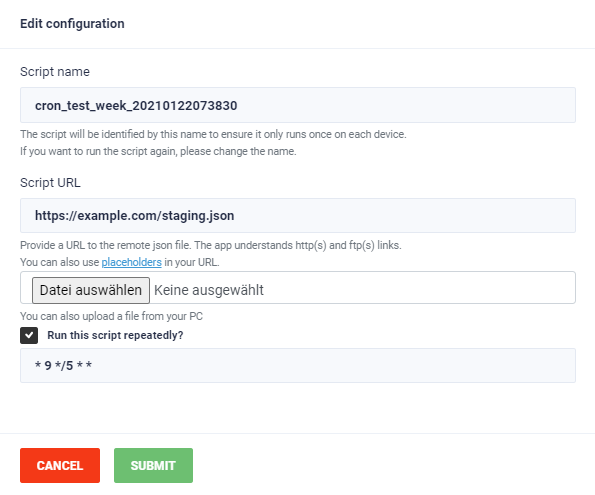
The name of this entry will be updated every time the script should be executed and the current date and time will be added to the end of the name. For this to work initially, make sure to end the name with a underscore.
Hint
Any time values set are executed at server time which is UTC!
Examples
1 0 * * * Run every day at one minute past midnight (00:01)
30 9 * * 5 Run at 9:30 every Friday
0 0 */5 * * Run at midnight every 5 days (eg. 2021-01-30, 2021-02-05, 2021-02-10)